
Subscribe and receive email notifications of new blog posts.
 RSS Feed
- 2026 | 23 Posts
- 2025 | 52 Posts
- 2024 | 50 Posts
- 2023 | 55 Posts
- 2022 | 83 Posts
- 2021 | 70 Posts
- 2020 | 43 Posts
10
Should You Upgrade to Windows 11?
Windows 11
From Your Friends at Integrity Computer Consulting and Repair
(If you own a Mac, this doesn't apply, your OS is updated yearly.)
Many of us have seen the update for Microsoft's newest operating system (OS), Windows 11 come through on our laptop or desktop PC. Some of you have likely had it automatically applied.
If you have NOT seen the update, your computer may be too old to upgrade. This is not a cause for concern!
Anyone can stay safely on Windows 10 until its End of Life (EOL) date of October 14, 2025.
And even then, Microsoft may offer extended support as they have done for all other operating systems before it.
If you have seen the update, have you ignored it? You might be able to upgrade to Windows 11. Most notably, the Windows update icon down by your clock won't go away and now has a blue dot on it (instead of an orange/yellow or red one) like this:

So should you make the jump to upgrade your current PC to Windows 11? What will it do? What will it change? What will it break? Will it affect you much?
The answer is, it depends. Like people on the planet, our computer environments are all different, unique. With each individual and different environment, the answer varies. It is complicated because no 2 environments are the same. But this time, Microsoft has given us tools to check.
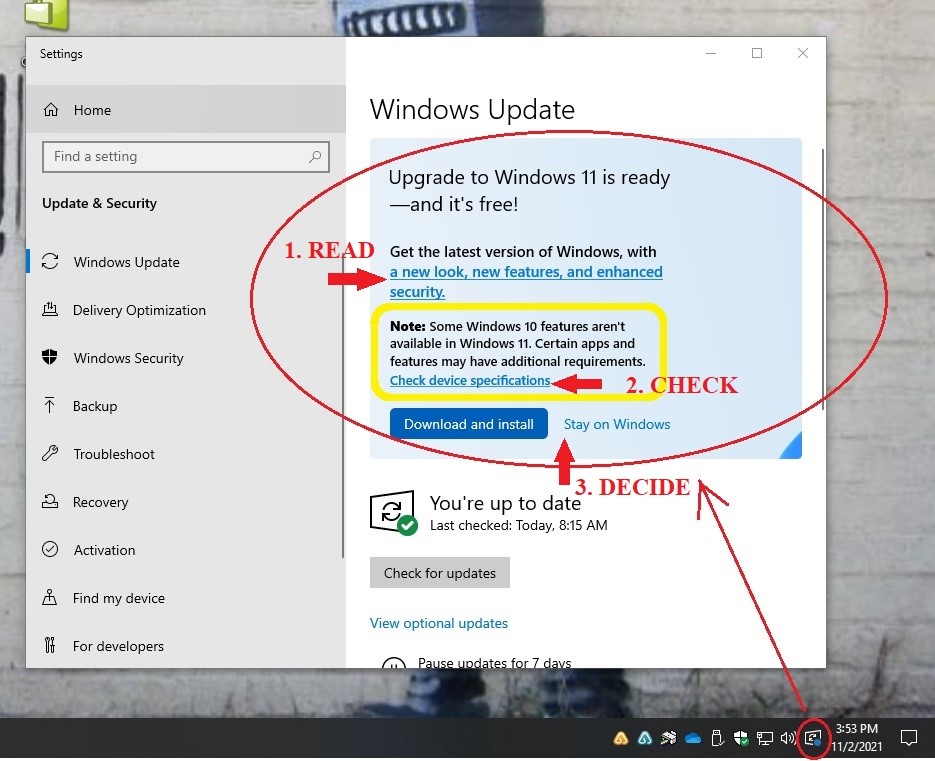
We recommend you take the following steps if you are prompted for the upgrade:
- Read about the upgrade. Is it for you?
- Check if your PC components can get the upgrade. Will it work for your computer?
- Decide if you want the upgrade or to stay on Windows 10
(please call or email our office if you have any questions or need assistance doing any of the steps above and pictured below)
Our findings? Most of the PCs that have upgraded from 10 to 11 are working fine without many significant issues; however, if you have older software (QuickBooks and Quicken apply) or older peripherals like printers, wireless mice, keyboards, and speakers, they may not work with Windows 11. We are finding that we have had to reinstall some printer and copier drivers and remap network drives.
If your computer is 2 years or newer, you have current software, you don't mind the change, and/or have the time/patience to learn Windows 11… upgrade.
If you have any hesitations or concerns, please contact us before making the jump. Advances in technology can be both great and frustrating. We are here to help.
Call our office (208-288-4345), or email us (info@integrityidaho.com) if you have any questions or need immediate assistance!